I just wanna play the darned thing!

Welcome to my corner!
And welcome to the Introduction to . . .
Sequencing 101: How to EDIT or make a MIDI from scratch!
Written in retrospect: This INTRO is a bit long. I know that. But trust me,
the actual tutorials are much more "view" than "read". Not a lot of text, and
hands on. Please keep that in mind while you read the following.
Let me ask any of you who use MIDI files for performances . . .
Have you ever had a MIDI of a song you LOVED (the song, not the MIDI), but the MIDI was NOT
how you wanted to perform the song? Maybe there's a part where you want to really belt it out!
But there's no build up in the MIDI. Maybe you REALLY want to do a solo you worked on. But there's
no solo chorus in the MIDI.
As a performer, you need to be able to make each of your backing tracks exactly how you want to
perform the song. Put YOU into the MIDI backing tracks.
We're going to take a plain old "blah" MIDI file. The same file. All of us. And edit the living daylights
out of it. Step by step.
You'll download the MIDI. And we're all going to transform it into a WORK OF ART!
So you will actually do things like change the key, tempo, delete unwanted tracks, add tracks,
delete unwanted parts of the song (like remove a chorus or a solo) and ADD IN parts to the
whole song. Like adding in an extra solo or chorus.
We'll change the instruments used on some of the tracks. We'll actually change the bass line!
Yeah, to a different pattern! How? Buy learning how to take a track from a different MIDI and
importing it into YOUR MIDI!
We'll also go over some cool tricks you can use to make your performance backing tracks sound
WAY COOLER! I'll cover things like . . .
Why can't I hear the kick drum? Why can't I hear the flute!!! I changed the key of the song and
now I can't hear the bass guitar. But it's in there! When I play some of my backing tracks through
my PA the right speaker is usually too loud on some of my songs. And on some, the left speaker is
too loud! Sometimes I can't hear some of the instruments in the track when I play them through my PA!
You'll learn how to find out if the problems above are because of your
MIDI file, or how you have your MIXER set up to play MIDI files.
This is going to be a LONG series of tutorials. Travel at your own speed. But I warn you . . .
Also travel at your own RISK! You just might get HOOKED!
OK, the first jargon, professionally recognized MIDI music term
you're gonna learn is "Ba-lo-neee".
Ba - lo - neee!
Any idea how man times I've had this conversation?
'Um, you just use MIDI files you find on line, and use them as
your backing tracks with NO EDITING?!'
'Yup. I never edit them. I don't know how to edit them.'
'So you sing/play over the melody that's already 'IN' the MIDI?'
'Yeah, I don't like that, but it's OK.'
'It's OK to whom? Do you think your audience enjoys hearing
the melody in the tracks while you sing or play over it?'
'Um, I dunno. Maybe not so much?'
'What if it's in the wrong key for you?'
'Well, I look for a different MIDI. Or I don't do the song.'
'Why on earth don't you just edit the MIDIs so they're exactly
how you want to do them?'
"I can't edit MIDIs. I don't have the skills." Ba-lo-neee!
"I can't create MIDIs from scratch. I don't have the patience." Ba-lo-neee!
"I don't have the software." Ba-lo-neee!
"I can't read music." Ba-lo-neee!
"I'm not a skilled, performing musician." Ba-lo-neee!
"I play strings or horns, not keys. So I can't program MIDIs." BA-LO-NEEEE!
"I don't have any computer skills." Ba-lo-ummmm-errr-hmmmmm!
OK, enough with the excuses. You can't [plug in whatever you want here]
because you don't WANT TO badly enough!
All the 'reasons' listed above are certainly valid. No question. And if they apply
to you, then YES it will be more of a challenge for you to sequence, or write, or
make, or edit a quality MIDI. Call it what you will.
I'm not going to pull any punches here. I will, however, help you get through some
of the issues listed above. But you're gonna need to WANNA!
And believe it or not, it's not going to be all that difficult to learn. You only need
two things to make this happen. YOU gotta wanna, and you need me as your coach.
And if you want it badly enough, you don't even need me as your coach. YOU can
make it happen!
So where do we start. I thought about this for some time before I decided what
approach I'd use. I'll take you back to my humble MIDI beginnings. Share with
you what my personal challenges were. And how I resolved them.
This tutorial isn't going to cover everything. That'd be impossible for a tutorial.
But it will more than get you started. Because what I'm actually going to do is . . .
Get you THINKING!
OK, here we go!
MIDI Sequencing 101 . . .
For me it started with the Guitorgan. I never owned one, but man, I wanted one!
Raising 4 kids, back then a good quality guitar was around $350 to $500. I mean a
TOP OF THE LINE guitar like a Fender Strat or Telecaster, Gibson Les Paul, or SG,
Guild Starfire. All in that range. A Guitorgan? $3000!
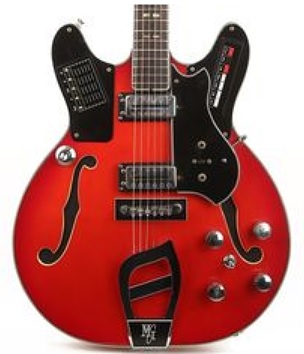
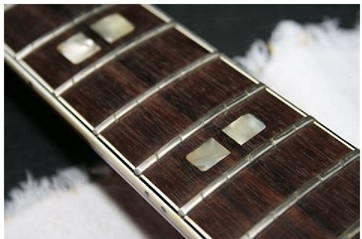
What it did . . . Basically it was a guitar. Each fret was actually 6 frets. Each string
had individual frets up the entire neck. When you pressed a string and picked it,
it sounded like any other guitar. But press AND HOLD a string at any fret, and
you got an organ! Yup. So press and hold a chord, you had an organ playing the
chord. And you could strum the chord as well, getting a regular sounding guitar
chord over the organ.
That's where it started for me. I played Classical, Jazz, Blues, Rock. Been in bands
forever. But I wanted something different. Bands were cool and all. But I liked the
personal, up close attention I got when I did Jazz gigs. Solo gigs. But I wanted to play
more than Jazz clubs and events. I wanted to 'rock out' too!
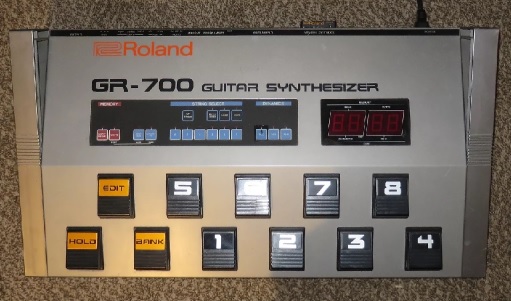
Then I discovered the Roland G-707 guitar with the GR-700 MIDI controller. MIDI
what? Man, that changed my life!
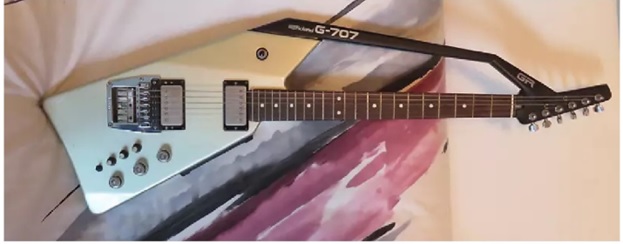
The MIDI controller allowed me to access any keyboard sound any electronic key
board could play. Various organs, pianos, horns, strings. WOW. Plus this thing called
a MIDI Thru. Hmmm. I got one and pretty soon bought another MIDI thing called a
MIDI tone generator. It was essentially another keyboard, minus the actual 'keyboard'.
So I could connect the Roland and the other tone generator together. When I played a
chord on guitar, the Roland could play one instrument, and the Yamaha could play a
DIFFERENT instrument, literally at the same time!
So I created a cool One Man Band. I was busy as all get out. I had a volume control for
the guitar. One for the Roland MIDI. And one for the Yamaha.
EX: I played Nights In White Satin. The guitar parts were just strummed chords, a
little bit of arpeggiation. Then I set the Roland for symphony strings. And the Yamaha
for longer delayed, slow attack deeper strings. Rocked the volumes so I could swell
the strings in and out as I strummed the guitar parts and sang the song.
That was the start. I was trying to figure out how I could simplify what I was doing.
I knew keyboard players who were doing the same thing I was doing. But I watched
them and they did half the work I was doing. And I found out their secret!
Sequencing! They played a part, while in their studio, on the keyboard. And RECORDED
what they played. The 'recording' on their keyboard wasn't actually 'music'. Not sound.
But teeny electronic and numeric characters! Events. And those events could be triggered
to play back whenever you wanted.
When you watch a great band playing in a club live, and they have a keyboard player,
a lot of what you hear isn’t actually being played LIVE. It was played months or years
ago! You might hear some awesome horn section, or strings. Or additional percussion.
The band might sound like a 9 piece, but only have 4 actual players.
Those 'sequences' . . . are MIDI FILE BACKING TRACKS! And you cannot go to a live
performance today, regardless of the band you hear, and I mean concerts not bar
gigs! . . . and not hear backing tracks. Current recording artists, or classic rock
concerts with the BIG NAME bands from the past. They ALL use (and used) backing
tracks. Santana? Yeah! I was at a live concert back in the late 80s. Instead of an 11
to 13-piece entourage he was on stage with only SIX other players. Most of the horns
and percussion were back tracked and playing through the PA!
So, how could I emulate that, being a guitarist, not a keyboard player?
MIDI FILES! And my journey continued to the next level!
Jumping ahead a bit . . . There was little to no help out there for me. I had to figure
it all out on my own. No internet. No incredible on-line forums like thewaynereedconnection.com.
I started mainly making bass guitar and drum tracks. Added a lot of other cool stuff
with the G-707. I eventually phased out the G-707 as I started adding organ, strings
and horns to my MIDI files.
I soon found there were several ways to get the information into the MIDI
software. I could use the actual sheet music, I could key in notes using the
PC keyboard. I could MIDI an instrument into my PC.
Now the early 1990s, the Internet became a tool! I got a better MIDI editor. And
started by doing what I have suggested to many of you. I started by finding MIDI files,
and editing them. Making them better. Or longer. Or shorter. Or faster, slower,
different key, different instruments.
The search was often painful. You'd find worthless garbage MIDI files a lot. Or you'd
find a MIDI with only one verse. Sometime (often) no intros, outros. Terrible drum
tracks. HORRIBLE bass tracks! (When did Rock n Roll and heavy Blues start using
'UmPaPa' band bass patterns??!?)
I discovered 2 things that to this day are the most powerful of all MIDI editing
tools. Piano Roll and the EVENTS list! I met a lady performer who was a year
or so ahead of me on the MIDI thang, plus she was a keyboard player. That's a
bit of an advantage over a strings player. She was the first person to actully help
me on my MIDI journey. The showed me what Piano Roll was all about. I remember
her saying . . . "Piano Roll is your friend!"
I soon learned how to MIDI my guitar into my computer and into my MIDI software.
Plus I had a MIDI horn I could MIDI into my PC for adding hooks, etc. easily.
For a while I used some Roland MIDI gear for live performances. Played the MIDIs
through the PA. But for me, unlike most of the tracks performers I know . . . my
MIDI journey was changing once again, as my 'destination' changed.
Those who know me know I don't use MIDI for performances. I used to. But
have gone a different route. Our band is starting to use MIDI more and more
for things like controlling our lights so they follow our backing tracks automatically.
But our actual backing tracks have no MIDI in them.
I wanted to let you all know this so you don't come back later and ask me why I
have all this MIDI gear, own MIDI related Websites, forums, etc.. Because MIDI
made it all possible! And I DO still use MIDI for making backing tracks. Just not
exactly like most people make their backing tracks.
OK, that's the history part. I've been gigging since 1964 (if you count playing for free)
and since 1965 if you only count paid to play gigs. Wrote my 1st computer program in
Sept of 1968. Had and still have guitars and amps from the 1950s and 1960s. And 70s,
80s etc.. And hopefully I'm going to help you learn how to make MIDI files!
~ ~ ~ ~ ~ ~ ~ ~ ~
Man, where to start. OK, I'm not going all the way back to MIDI 101. Not in this tutorial.
I'm going to assume you have and know some basics. A PC (or Mac), and a midi editor.
There are dozens out there. From free to DAWs costing $1000s. And it's impossible to
do a thorough MIDI tutorial that includes every editor. Can't do it. But . . . there are
many things, most things actually, that are the same with all editors. You’ll need to
take what I say and apply it to YOUR editor. If you have questions, join the forum and
ask away!
PC or Mac? I can help you mostly with PC issues. The thewaynereedconnection forum can help you with
Mac issues. The editors I use below are fo PC.
What I'll do for this tutorial is use 3 very good MIDI editors. Each example I'll show you
on each of the three. One is free. Or rather it has a free version, and a 'pay for' version
that of course has more options. But the free version will get the job done! That's Anvil
Studio. (AS) Another editor I'll use for each example is PGMusic's PowerTracks Pro Audio.
(PT) This is the main editor I use to do all the grunt work when making a new MIDI. PT is $49.
And WELL WORTH IT! And the 3rd is my favorite MIDI editor by far. Acoustica's Mixcraft. (MC)
It's about $170 or so. And trust me, once you start doing more advanced editing, it should
become your GO TO editor! (Unless you'd like to stay with PT and upgrade to their more
powerful editor that cones with Band In A Box, Real Band! RB looks and feels identical to PT.
I don't recommend starting off with Mixcraft. It has a fantastic sounding library! WAY better
than any other MIDI editor I ever heard. And it has a LOT more high end tools. But you're
not going to use most of them for some time. And also, because there are more tools, it's
more difficult to work with until you really get to understand all the functions.
What we're going to do is take a MIDI you already have and edit ALL of the important
things you'd typically ever want to edit in a MIDI. We'll cover it all!
Then I'll cover the beginning steps of building a MIDI from scratch.
And regardless of what all I said above, it's not all that hard to do.
OK, I just had a thought. How about we take a look at a few MIDI editors?
Let's take a look, get rid of some mystery and apprehensions. I'll show you
what they're all about. Then we'll jump to the actual lessons.
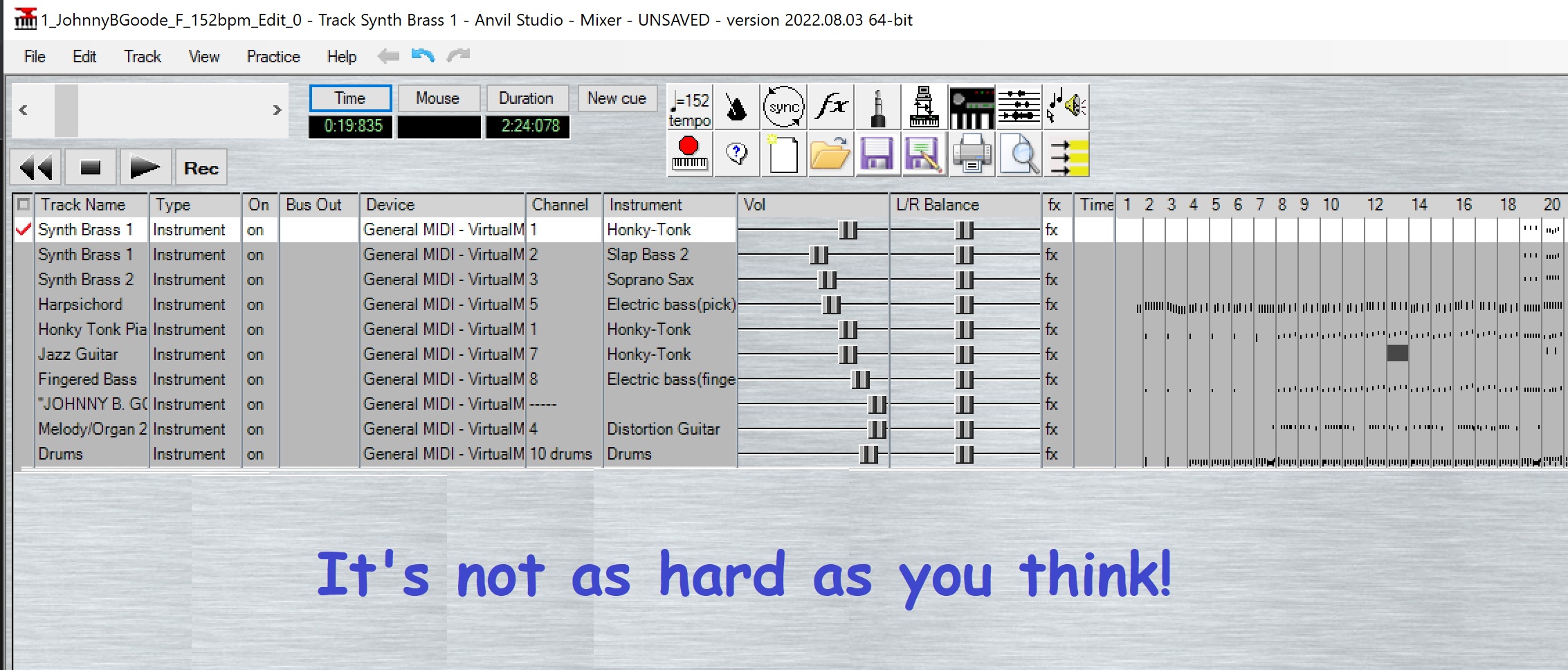
OK, here we go. Let's look at some editors.
Click to go back to the main Tutorials and Workshops Directory
Please help keep us online with a small donation!
Wayne's Corner Directory
Here's the theory tutorial in PDF format.
If you want it in a .doc or other Word format, 
Click here and scroll to the bottom. Download the theory article.
Download which ever format you like. And read it. Just read it! In no time
you'll know more theory than probably anyone you know! Read it until you
GET IT! And you'll become the theory go-to guy or gal in your music circle!
Just 11 pages with a LOT of PIX!
If you're a musician, what ever the instrument, this will help you tremendously.
If you're a blues harp or harmonica player, you'll find this info the answer to
ALL of your questions. It's time for YOU to be IN THE KNOW!
Wayne (Reed) Knazek ~ Email Me Here! ~ My personal Web site
Join Wayne's Corner Support Group Forum

Search All Of Midkar Here ~ 43,736+ FREE Backing Tracks/
MIDI Files, KARS and BIAB files PLUS 23 User Styles. Nearly 200 pages!
WC's Site Directory
WC's HOME Page
SITEMAP
This site is free for all. The tutorials, workshops. 43,813 MIDI, KAR &
BIAB backing tracks files, 23 BIAB User Styles. A FREE SoundFont,
Timbres of Heaven. Free MIDI players and editor!
The fees for a site this large (Nearly 200 pages with over 50K files)
is pretty high, as you can imagine.
Please consider making a small donation to help keep us online. It
would help so much! Thanks! Wayne
PS: I pay for the site and all hosting, security and domain related
expenses out of pocket. Donations appreciated. Please click the link below.